
How to Buy GRAM (Toncoin) on Bybit in 2026: Spot, Convert or Card
Publicado · Actualizado · Cómo verificamos
To buy GRAM (the coin called Toncoin until June 2026) on Bybit, complete Standard KYC, get USDT into your account — by crypto deposit, card or P2P — then open the GRAM/USDT spot pair (it replaced TON/USDT on June 22, 2026) and place a market order to buy now or a limit order to set your price. Bybit's standard spot fee is 0.1% per trade, so $100 of GRAM costs about $0.10 in fees; Convert is simpler but builds its margin into the quoted price. GRAM is the same coin as TON — after buying, keep it on Bybit or withdraw it on the TON network to Tonkeeper or Telegram Wallet to buy Telegram Stars on Fragment or stake it.
How much GRAM for your USDT?
Live price, Bybit spot fee (0.1%) included.
One Coin, Two Tickers: Where GRAM Trades Under Which Name
| Venue | Ticker | Status |
|---|---|---|
| Bybit | GRAM/USDT | New ticker live since June 22, 2026 — order book and history carried over |
| Kraken | TON/USD, TON/USDT | Still the old ticker as of July 2026 — same coin |
| TON DEXs (STON.fi, DeDust) | TON | On-chain name unchanged; the network is still The Open Network |
| CoinGecko / CoinMarketCap | GRAM | Price pages renamed, historical charts preserved |
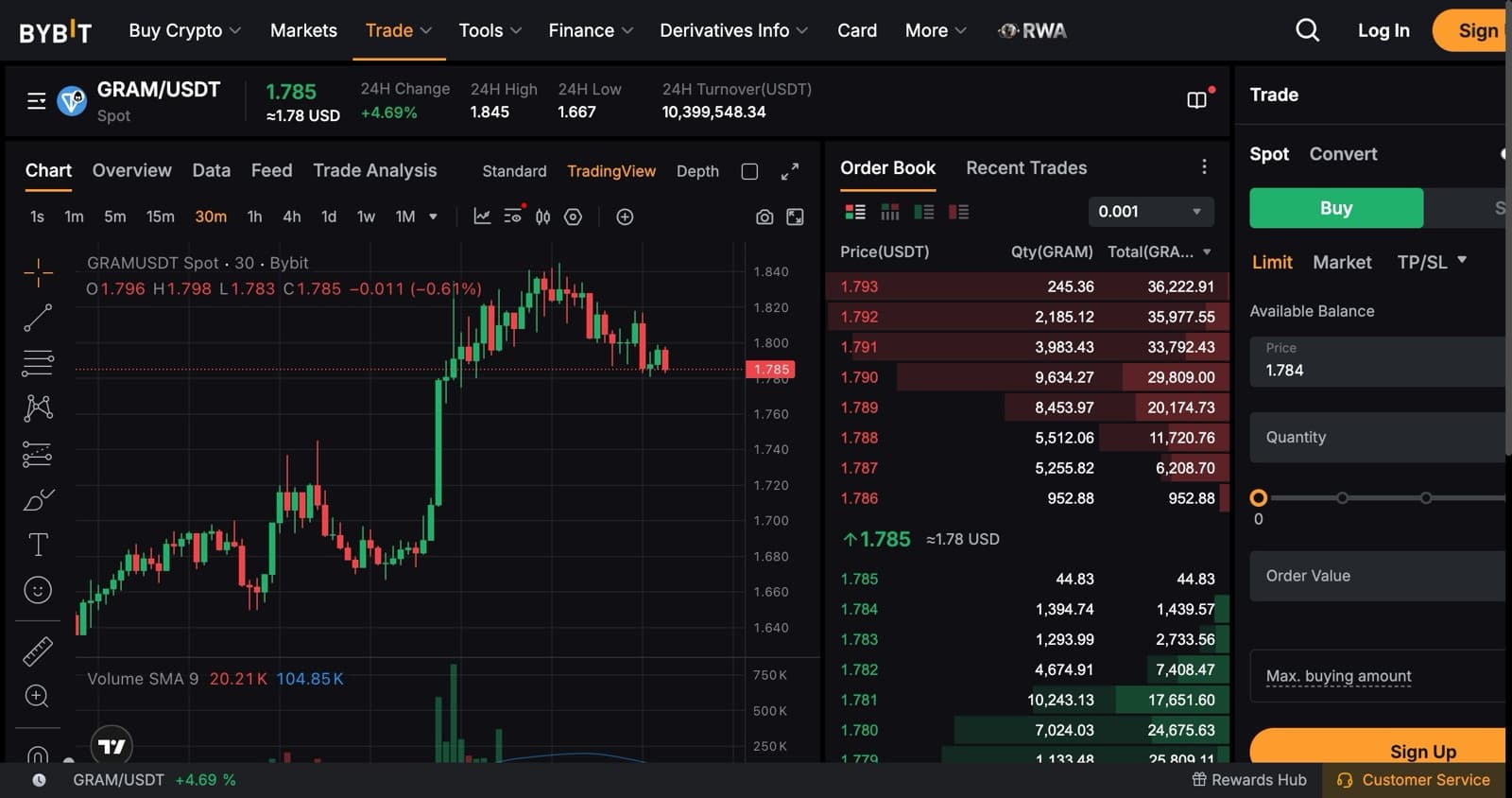
Buying GRAM on Bybit, Step by Step
- 1
Complete Standard KYC (ID + face scan) — Bybit doesn't allow deposits or trading without it.
- 2
Fund the account with USDT: deposit from a wallet, buy with a card under Buy Crypto, or buy through P2P.
- 3
Go to Trade → Spot and search 'GRAM'; open GRAMUSDT (listed as TONUSDT before June 22, 2026).
- 4
Choose Market to buy now (enter the USDT to spend) or Limit to set your own price, then tap Buy GRAM.
- 5
Your GRAM appears in the trading account within seconds.
- 6
To move it to your own wallet: Assets → Withdraw → GRAM → TON network → paste your Tonkeeper or Telegram Wallet address → confirm.
Bybit not available where you are? Kraken lists it as TON
Bybit doesn't serve your country. Kraken — licensed since 2011 — trades the same coin under its old TON ticker.
Trade TON (GRAM) on KrakenTON Is Now GRAM on Bybit — Same Coin, New Ticker
Toncoin was renamed Gram (GRAM) on June 15, 2026 after a community vote with about 81% in favour, and Bybit switched its spot pair from TONUSDT to GRAMUSDT on June 22. Nothing about the coin changed: same blockchain (still The Open Network), same balances, no swap and nothing for holders to do.
When you buy, search 'GRAM'. Price history carried over from the old pair, and withdrawals still run on the TON network, so any Tonkeeper or Telegram Wallet address works exactly as before. Some exchanges and apps still show the TON ticker — it is the same asset.
Three Ways to Buy GRAM on Bybit
Spot (GRAM/USDT): the cheapest way. You trade against the order book at the standard 0.1% fee and choose between market and limit orders.
Convert: pick USDT → GRAM, see a quoted price and confirm. It is the simplest screen, but the margin is built into the quote, so it usually costs a little more than spot.
Card or P2P first: if you have no crypto, buy USDT with a card under Buy Crypto (fees and a spread apply) or from another user through P2P in your local currency, then trade the USDT for GRAM on spot.
Market vs Limit Orders
A market order buys immediately at the best available price — enter how much USDT to spend and confirm. On a liquid pair like GRAMUSDT the price you get is very close to the one on screen, which makes market orders fine for most purchases.
A limit order buys only at the price you set. If GRAM trades at $1.45 and you place a limit buy at $1.40, the order waits in the book until the price comes down to you. You get price control, but the order may never fill if the price doesn't reach it.
Fees on Bybit Spot
Regular accounts pay 0.1% for both maker and taker spot orders, so buying $100 of GRAM costs about $0.10; VIP tiers pay less. Bybit does not charge for crypto deposits — you pay only the network fee when sending.
Withdrawals carry a network fee and a minimum per coin and network. Bybit shows both on the withdrawal screen once you pick GRAM and the TON network, so you see the exact cost before confirming. For a very small purchase, check that the fee is worth paying, or keep the GRAM on Bybit until you have more to move.
What to Do With GRAM After Buying
Buy Telegram Stars on fragment.com — 1,000 Stars cost $15 there against $19.99 in the app, paid from Tonkeeper. Send it to friends through Telegram Wallet. Or stake it: since the April 2026 Catchain 2.0 upgrade, staking GRAM pays around 13% a year through Tonstakers or Tonkeeper's pools.
If you plan to hold for long, move it to a self-custody wallet such as Tonkeeper and keep the 24-word recovery phrase offline. An exchange account is for trading, not for savings.
Frequently Asked Questions
Related Guides
Buy Telegram Stars with TON (GRAM): Tonkeeper Steps, KYC & Prices
Buy Telegram Stars with TON (now GRAM) from Tonkeeper: Fragment prices in dollars and GRAM, the KYC check, and how to buy without KYC.
Bybit to Telegram Wallet or Tonkeeper: Withdraw TON (GRAM) & USDT
Send TON (GRAM) or USDT from Bybit to Telegram Wallet or Tonkeeper: the right network, when you need a memo, the fee, and what to do if it's late.
Convert TON to USDT: Cheapest Methods and Fees in 2026
Swap TON to USDT using Bybit, OKX, or TON DeFi. Compare fees, speed, slippage, and safest steps before cashing out.