
Telegram MCP Server: Connect Telegram to Claude, Cursor & AI Agents (2026)
How to give an AI agent access to Telegram through MCP — the Bot API and user-account options, setup for Claude Desktop and Cursor, and the security tradeoff nobody spells out.
Published · Updated · How we check
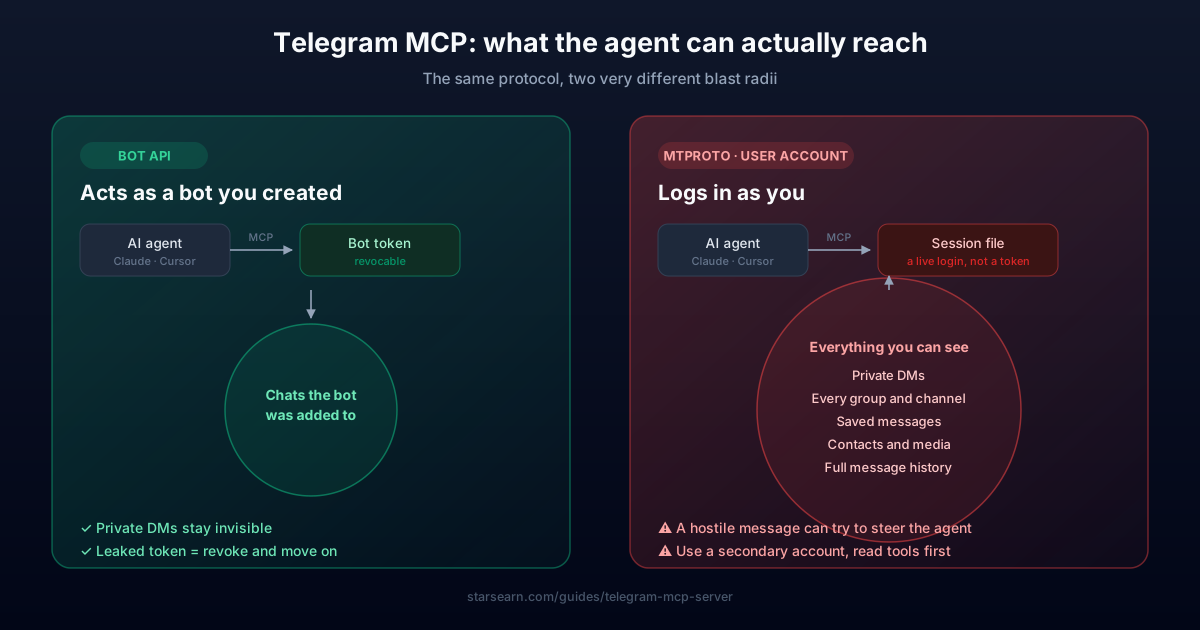
A Telegram MCP server lets an AI assistant read and send Telegram messages by exposing Telegram as a set of tools over the Model Context Protocol — the open standard, introduced by Anthropic in late 2024, that connects AI clients like Claude Desktop, Cursor, Windsurf and Codex CLI to outside systems. There are two fundamentally different kinds, and picking the wrong one is the mistake worth avoiding: Bot API servers act as a bot you created, so the agent only ever sees chats your bot was added to; MTProto servers log in as you, which hands the agent your entire personal Telegram account — every private conversation included. Both are covered below, with the setup config for each client and an honest read on when the account-level version is worth the risk.
PROS
- Lets an agent send, read and search Telegram without custom glue code
- Same config works across Claude Desktop, Cursor, Windsurf and Codex CLI
- Bot API variant is tightly scoped — the agent sees only your bot's chats
- Turns Telegram into a notification channel your agent can use unprompted
CONS
- MTProto servers expose your whole personal account, DMs included
- Most public servers are one-person side projects with no security review
- A session file is a live credential — leaking it hands over your account
- Telegram rate limits apply, so a chatty agent will get throttled
What MCP Actually Is (And Why Telegram Fits It)
The Model Context Protocol is a standard way for an AI client to call outside tools. Before it existed, wiring an assistant to a service meant writing a bespoke integration for that one assistant. MCP replaces that with a contract: a server advertises its tools, any compliant client can call them, and the same server works in Claude Desktop, Cursor, Windsurf, Codex CLI or anything else that speaks the protocol.
Telegram is a natural fit because so much of it is already API-shaped — messages, chats, files, group administration. Wrapping that in MCP means an agent can act on 'tell me what I missed in the dev channel' or 'send the build output to my saved messages' without you writing a line of integration code.
It also means the agent gains real reach into a place where your actual life happens. That is the part worth slowing down on, and it is why the split between the two server types matters more than any feature list.
The Security Tradeoff Nobody Spells Out
MTProto servers authenticate with your phone number and store a session file. That file is not a scoped token — it is a live login. Anything that can read it can read your Telegram: private conversations, saved messages, groups you are quiet in. It does not expire the way a password reset would, and revoking it means terminating the session from Telegram's device list.
Now add an autonomous agent to that. Prompt injection is a genuine risk here rather than a theoretical one: if the agent reads a message whose text is written to manipulate it, and that agent also has send and read tools, a hostile message can attempt to make it act. The blast radius on a bot token is your bot's chats. The blast radius on a session file is your whole account.
The practical rule: use a Bot API server unless you specifically need to search or act across your personal history. If you do need MTProto, run it against a secondary account rather than your main one, keep the session file off any synced folder, and give the agent read tools before you give it send tools.
Where BridgeMind's BridgeMCP Fits
If you are setting up MCP servers as part of a broader agent workflow rather than as a one-off, an agent platform like BridgeMind (from $16/month on annual billing, on your own AI subscription) handles the tooling around the agents for you. The tradeoff versus a self-hosted server is the usual one: less control and a subscription, against not maintaining a stack of community servers yourself.
It is worth being clear that this is not required for anything on this page. Every server listed above is free and open source, and a Bot API setup with Claude Desktop costs nothing beyond the time to paste a config block. BridgeMCP is relevant if you are already running agents that need several integrations at once, not as a prerequisite for connecting Telegram.
Quick Comparison
| Feature | Bot API serverRecommended | MTProto (user account) server |
|---|---|---|
| Logs in as | A bot you created | You, personally |
| Can read your private DMs | ❌ Never | ✅ All of them |
| Credential at risk | Bot token (revocable) | Session file (full account) |
| Sees chats | Only where the bot was added | Every chat you're in |
| Search your own history | ❌ | ✅ |
| Setup difficulty | BotFather token, minutes | API ID + phone login |
| Safe default for most people | ✅ | ❌ |
Build your MCP config
Pick your client and how much access the agent should have. Every client keeps this file somewhere different — the path below is the one that matters for yours.
~/Library/Application Support/Claude/claude_desktop_config.json{
"mcpServers": {
"telegram-bot": {
"command": "uvx",
"args": [
"telegram-bot-mcp"
],
"env": {
"TELEGRAM_BOT_TOKEN": "<token from @BotFather>"
}
}
}
}Windows: %APPDATA%\Claude\claude_desktop_config.json
Quit Claude Desktop completely (⌘Q — closing the window is not enough) and reopen it.
No install step — uvx fetches it on first run
pypi.org/project/telegram-bot-mcp — community-built, open source, no security audit. Read it before you run it.
Running several integrations at once rather than just Telegram? BridgeMind bundles managed MCP support as BridgeMCP on its Pro plan — less to maintain, at the cost of a subscription. Nothing on this page requires it.
See BridgeMind pricingStep-by-Step Instructions
Frequently Asked Questions
What is a Telegram MCP server?
It is a small program that exposes Telegram as tools an AI client can call over the Model Context Protocol. Once registered with Claude Desktop, Cursor or a similar client, the assistant can send messages, read chats or search history — depending on which server you install and what permissions it holds.
Is there an official Telegram MCP server?
No. Telegram does not publish one. Every option available today is community-built and open source, which is exactly why it matters to check what a given server logs in as before installing it. The commonly used ones are telegram-bot-mcp on PyPI for Bot API access, @harnyk/telegram-notifier-mcp on npm for send-only notifications, and dryeab/mcp-telegram for MTProto user-account access.
Can an MCP server read my private Telegram messages?
It depends entirely on the type. A Bot API server cannot — a bot only ever sees chats it was explicitly added to, and never your personal DMs. An MTProto server logs in as your user account and therefore can read everything you can, private conversations included.
How do I add an MCP server to Claude Desktop?
Edit claude_desktop_config.json and add an entry under mcpServers with the server's command, its args, and any environment variables it needs (typically your bot token or API credentials). Save it, fully restart Claude Desktop, and the tools appear in the client. Cursor and Windsurf use the same JSON structure in their own MCP settings.
Does this work with Cursor and Windsurf too?
Yes. That is the point of MCP being a standard — one server works across compliant clients. Cursor, Windsurf, Codex CLI and Claude Desktop all take the same server definition, differing only in where the config file lives.
Do I need to pay for anything to use Telegram with MCP?
No. The community servers are free and open source, and the Telegram Bot API costs nothing. Paid platforms such as BridgeMind's BridgeMCP bundle managed MCP support into a subscription, which is useful if you are running several integrations at once, but nothing on this page requires it.
Related Guides
Railway Free Tier for Telegram Bots: 2026 Limits + Copy-Paste Deploy
Deploy a Telegram bot on Railway in 2026 with BOT_TOKEN env vars, Python/Node examples, free-tier limits, $20 credits, and common errors fixed.
Free AI Telegram Bot Prompt Generator & Deploy Guide (2026)
Build & deploy a ready-to-use Telegram bot in 10 mins using AI agents. Includes copy-paste aiogram prompts, Railway config, and interactive spec builder.
What Is BridgeMind? 2026 Review: Pricing, Features & Honest Verdict
What BridgeMind does, what its $16–80/mo plans buy and who should skip it. Verdict with the founder's verified $201K ARR — no free tier, 7-day refund on Pro.
Get Weekly Stars & TON Updates
Market analysis, new guides, and earning tips — free, every week.
No spam. Unsubscribe anytime.
Calculate Your Potential Profit
If you are buying Stars to monetize your channel, check exactly how much you can earn.