
How to trade crypto with Claude or ChatGPT
Updated · How we check
By Mark, founder of StarsEarn. Tested with Claude in Kraken's paper mode on 13 Nov 2026; every exchange fact checked against the exchange's own pages (sources at the end). Written with AI assistance and reviewed before publishing.
You can now connect Claude, ChatGPT and other AI agents straight to a crypto exchange. In 2026 Kraken, Coinbase, Gemini, Bybit and OKX each released an official connection built on MCP (Model Context Protocol), so the AI can read prices and your balances and place orders. The safe way to start: Kraken's paper mode, which trades simulated money at live prices with no API key. When you go live, give the agent a key that can place orders but not withdraw, fund only what you can afford to lose, and approve every order.
Which Exchanges Let AI Agents Trade
| Exchange | Official tool | How it connects | AI apps | Practice mode | Can the agent move money out? | US |
|---|---|---|---|---|---|---|
| Kraken | Kraken CLI with a built-in MCP server · 11 Mar 2026 | Runs on your computer with your API key | Claude Code, Claude Desktop, Cursor, VS Code (Copilot), Windsurf, Codex | Yes — paper trading on live prices, no key | Withdrawal tools are off by default; every order or transfer asks you to approve it | Yes |
| Coinbase | Coinbase for Agents · 2026 | Remote MCP server, you sign in with Coinbase (OAuth) — nothing to install | ChatGPT, Claude, Claude Code, Codex CLI, Grok, Perplexity | Not offered | With a CLI key: transfers only between your own portfolios, no external withdrawals | Yes |
| Gemini | Agentic Trading · 27 Apr 2026 | MCP via the Gemini developer platform | Claude, ChatGPT, any MCP app | Not stated | Not stated | Yes |
| Bybit | Official trading MCP server · 22 Apr 2026 | Runs on your computer with your API key | Claude Desktop, Cursor, VS Code | Testnet | Depends on the key's permissions | No — Bybit doesn't serve the US |
| OKX | Agent Trade Kit · 2026 | Runs on your computer; a --read-only switch allows queries only | Claude Desktop, Claude Code, Cursor, VS Code | Not stated | Depends on the key's permissions | Not stated |
“Not stated” means the exchange's own page doesn't say. In the US, Kraken is the only one of the five that combines a local server, a no-key practice mode and an approval prompt on every order; Coinbase is the easiest from ChatGPT because there is nothing to install. Bybit doesn't serve US residents — see is Bybit legal in the US.
Build Your Safe Kraken Setup
Pick your AI app and how much the agent may do. The builder prints the exact command from Kraken's docs and the API key permissions to tick — and the ones never to tick.
1. Your AI app
2. What the agent may do
3. Run this in your terminal
claude mcp add --scope user kraken -- kraken-mcp -s market,paper,feedback
Needs the Kraken CLI installed first (step 1 below) — kraken-mcp ships with it.
4. API key
None. Paper trading uses Kraken's public prices and keeps a simulated balance on your computer.
How to Connect Claude to Kraken, Step by Step
- Install the Kraken CLI. Kraken's installer from its GitHub releases:
curl --proto '=https' --tlsv1.2 -LsSf https://github.com/krakenfx/kraken-cli/releases/latest/download/kraken-cli-installer.sh | sh
The MCP server,kraken-mcp, comes with it. Kraken says the CLI is a single binary written in Rust. Check:kraken --versionprints the version (ours: 0.5.1). - Add Kraken to Claude in paper mode. In Claude Code:
claude mcp add --scope user kraken -- kraken-mcp -s market,paper,feedback. Claude Code can also install it as a plugin:/plugin marketplace add krakenfx/kraken-cli, then/plugin install kraken-cli@kraken. - Practise. Ask Claude to paper-buy $100 of BTC at market and show your profit and loss. The paper engine fills orders against Kraken's live public prices and keeps the balance on your computer — no key, no real money. Expected: a filled order with price, fee and cost (ours: 0.00145 BTC at $68,941.90, $99.97 + $0.26 fee). If it fails: “Unknown pair” means a typo — use BTCUSD or the slash form BTC/USD; “Insufficient USD balance” means the order is bigger than the paper balance.
- Create a trade-only API key. In Kraken Pro's API settings tick Query Funds, the two “Query … Orders & Trades” boxes, Create & Modify Orders and Cancel/Close Orders. Leave Withdraw Funds unticked — Kraken's own docs say a key that places orders doesn't need it. Restrict the key to your IP address and set position-size limits and a pair allowlist.
- Go live with approval. Save the key with
kraken auth loginand add thetradeservice. Kraken marks order tools as dangerous and asks you to approve each call. Don't start the server with--allow-dangerous: it removes that check. If Claude reports a permission error, the key is missing a box from step 4 — edit the key in Kraken Pro; never add Withdraw Funds to fix it.
We Tested It: Claude Paper-Trading on Kraken
We installed Kraken's official CLI (version 0.5.1) and let Claude run a paper-trading session on 13 November 2026 at 18:58 UTC: check the Bitcoin price, open a $1,000 paper account, buy about $100 of Bitcoin, then check the result. The screenshots are the real output from Kraken — live prices, simulated money, no account and no API key.
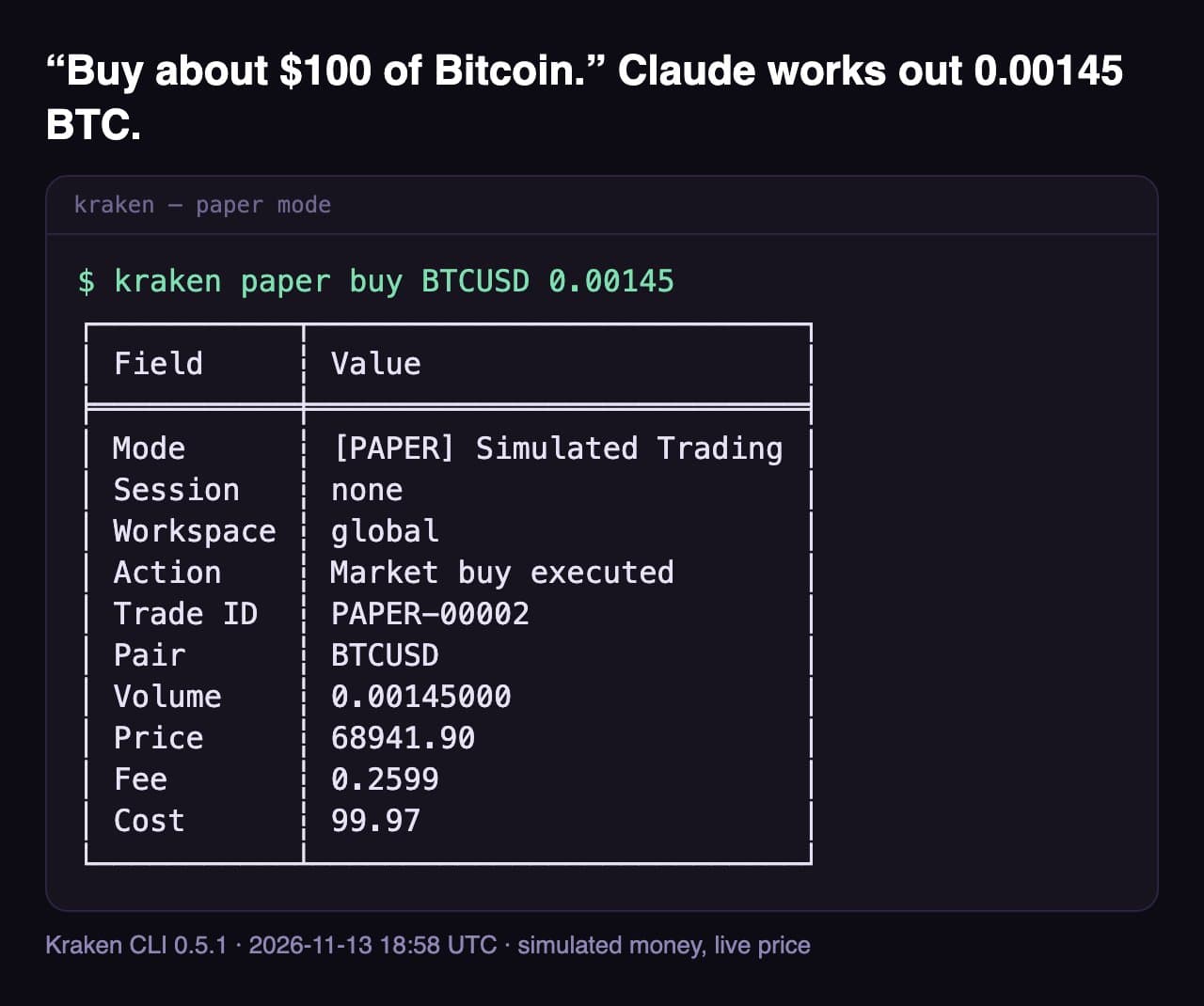
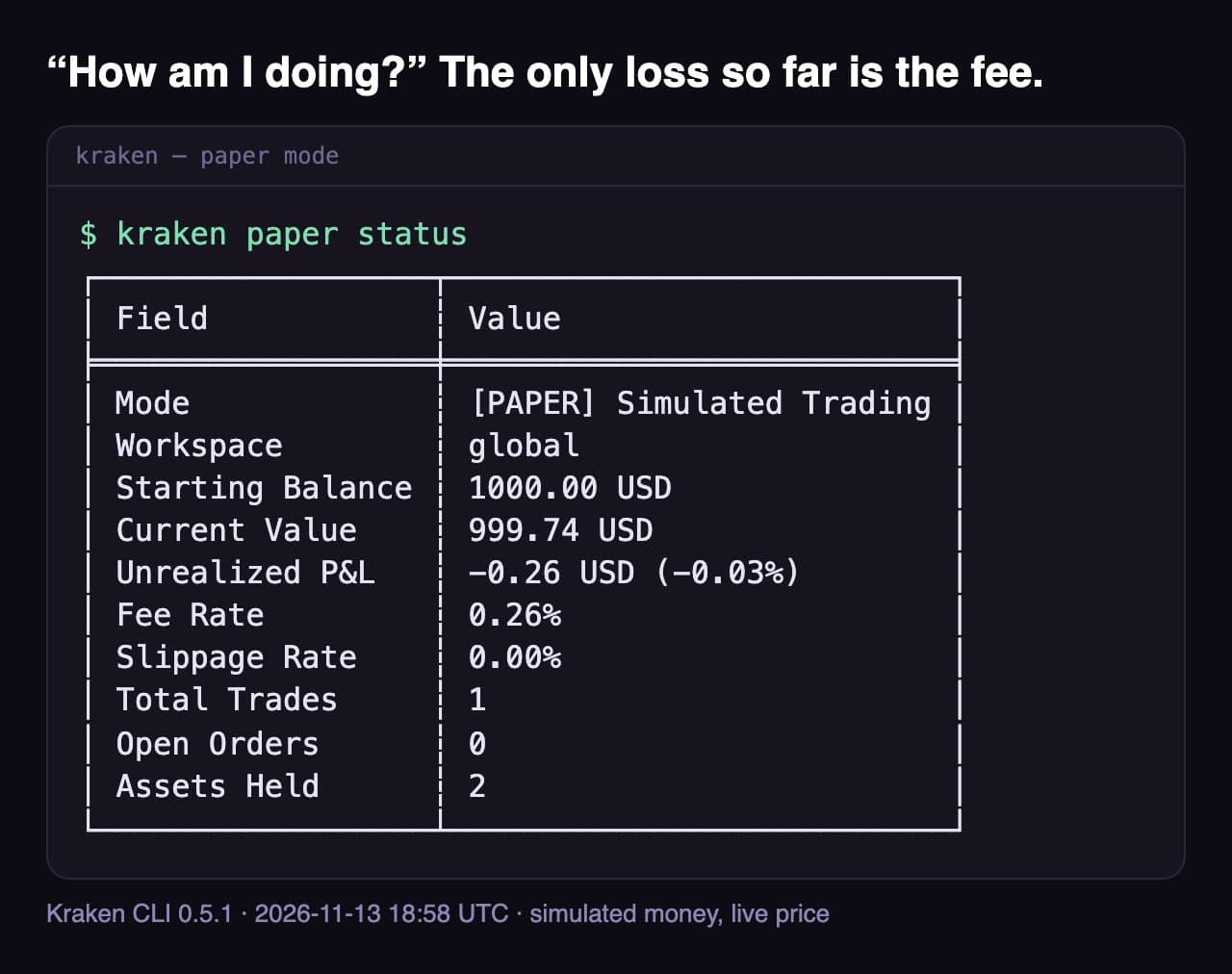
What we learned. It took four commands and no sign-up. Claude worked out the order size from the live price itself. Paper mode charges its own flat 0.26% fee, not your Kraken Pro tier, so a real account's fee will differ. The session ran through the CLI from Claude Code's terminal; through the MCP server (the builder above) Claude calls the same commands as tools and, in trade mode, asks you to approve each live order.
Six Tests, Pass or Fail
| Test | Command | Expected | What happened | Result |
|---|---|---|---|---|
| 1 · Buy | paper buy BTCUSD 0.00145 | Market buy fills at the live price | Filled at $68,941.90 — cost $99.97, fee $0.26 | Pass |
| 2 · Sell | paper sell BTCUSD 0.00145 | Market sell fills at the live price | Filled at $68,538.00 two hours later — $99.38, fee $0.26; the round trip lost ~$1.11 | Pass |
| 3 · Wrong pair | paper buy BTCXYZ 0.001 | Refused, nothing traded | "Unknown pair 'BTCXYZ'" — exit code 1, balance unchanged | Pass |
| 4 · Too big | paper buy BTCUSD 1 | Refused for lack of funds | "Insufficient USD balance. Available: 998.89, Required: 68716.29" | Pass |
| 5 · Sent twice | paper buy BTCUSD 0.0001 (×2) | Ideally caught as a duplicate | Two separate trades (PAPER-00006, PAPER-00008): no duplicate check — the agent has to avoid repeats | Watch out |
| 6 · Limit + cancel | paper buy … --type limit --price 50000; paper cancel | Order waits in the book; cancel frees the money | Placed with $5.01 reserved; cancelled, $5.01 released | Pass |
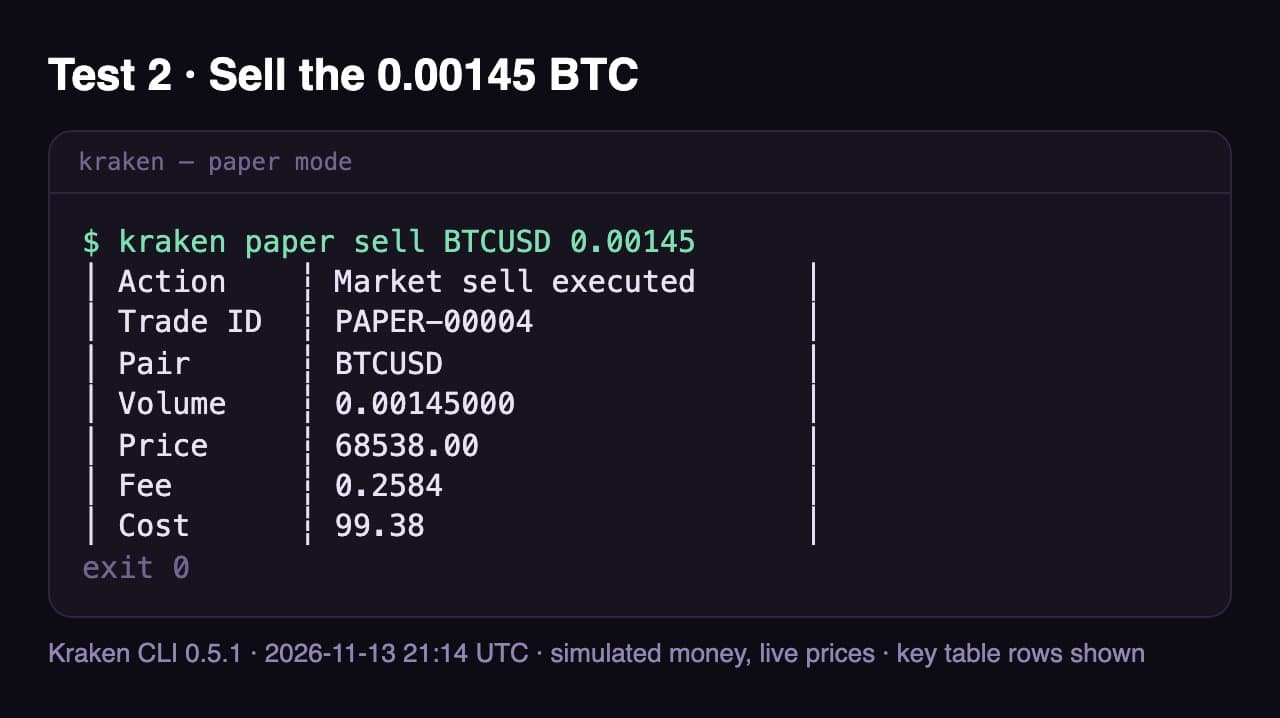
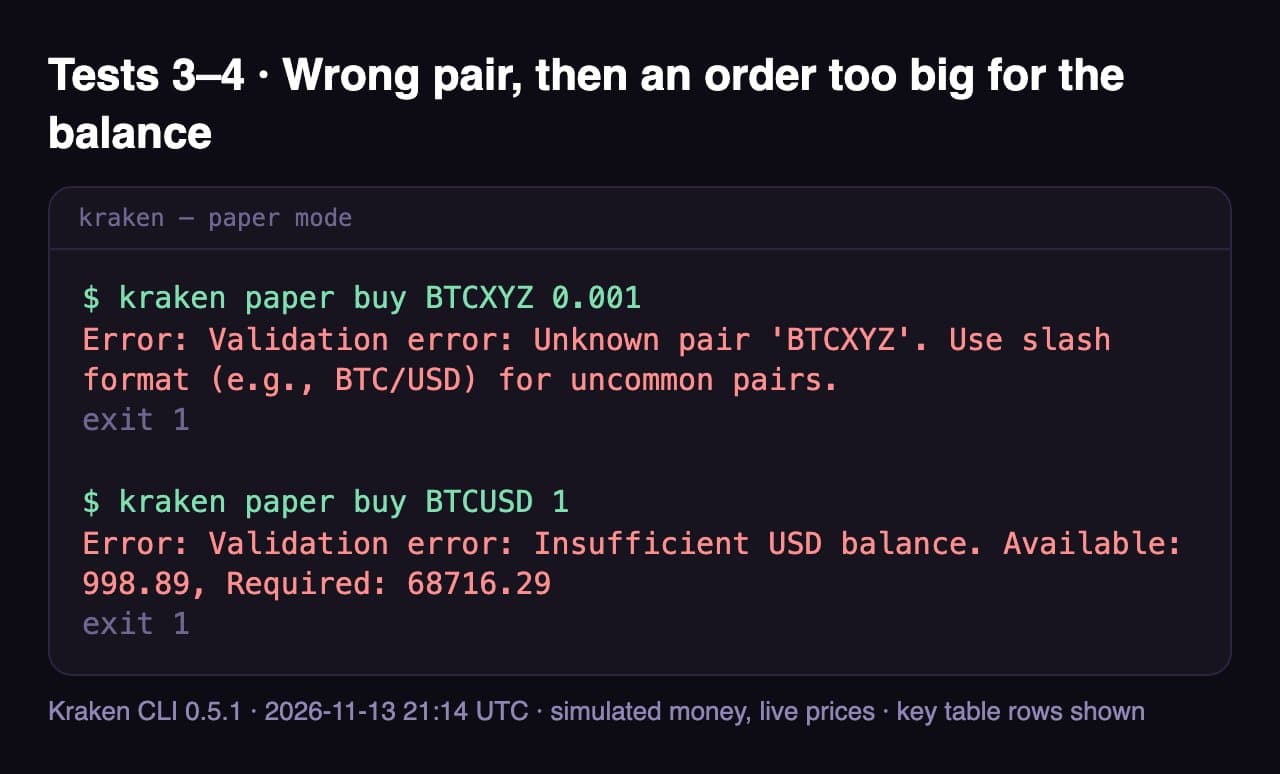
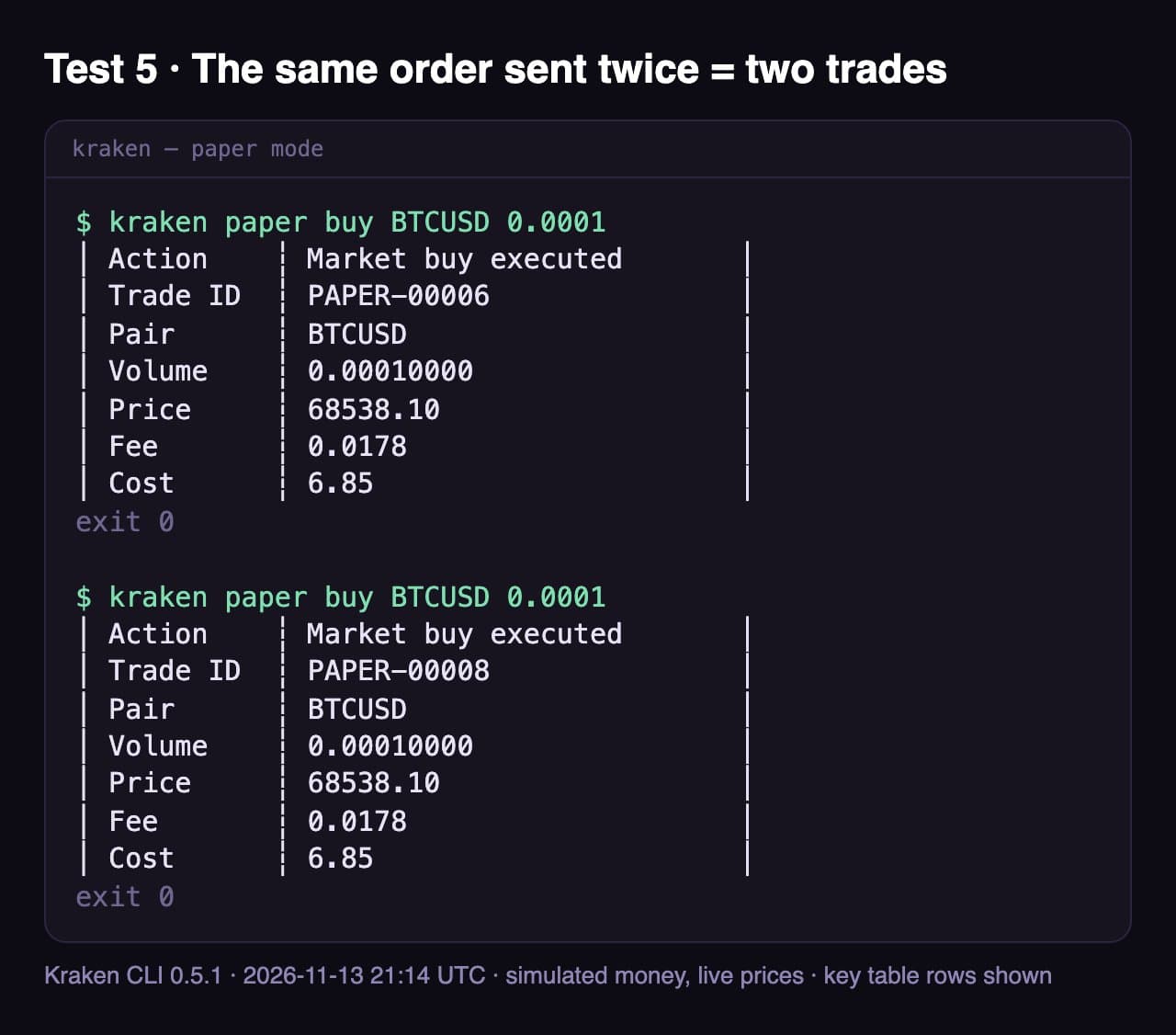
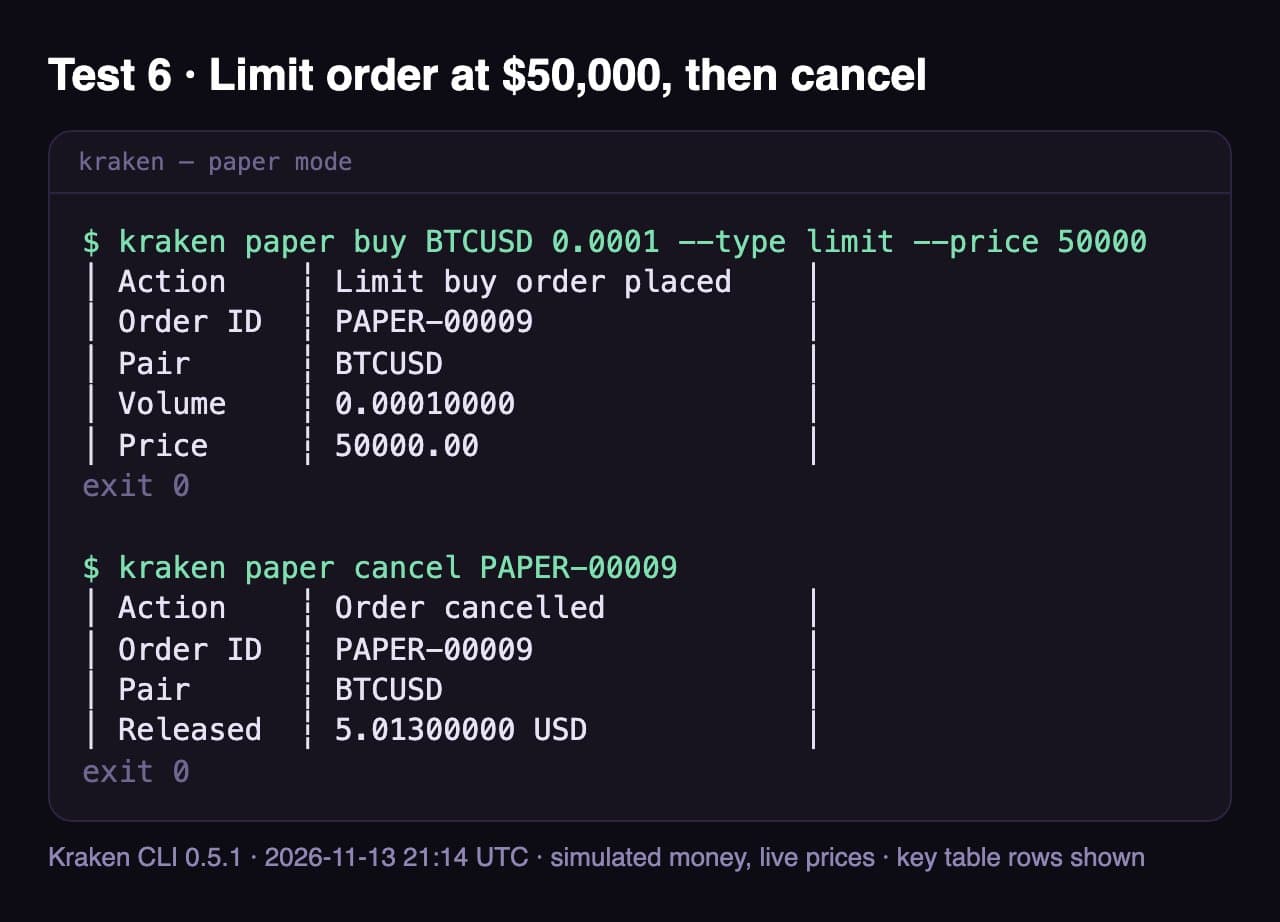
Method: Kraken CLI 0.5.1 from Kraken's official installer, global paper account funded with $1,000, tests 1 at 18:58 UTC and 2–6 at 21:14 UTC on 13 Nov 2026; commands run by Claude in Claude Code's terminal. Screenshots show the real output; workspace notes on stderr and table rows not listed are left out. Final paper balance: $998.86 of $1,000.
See It Working: Kraken CLI and Its MCP Server
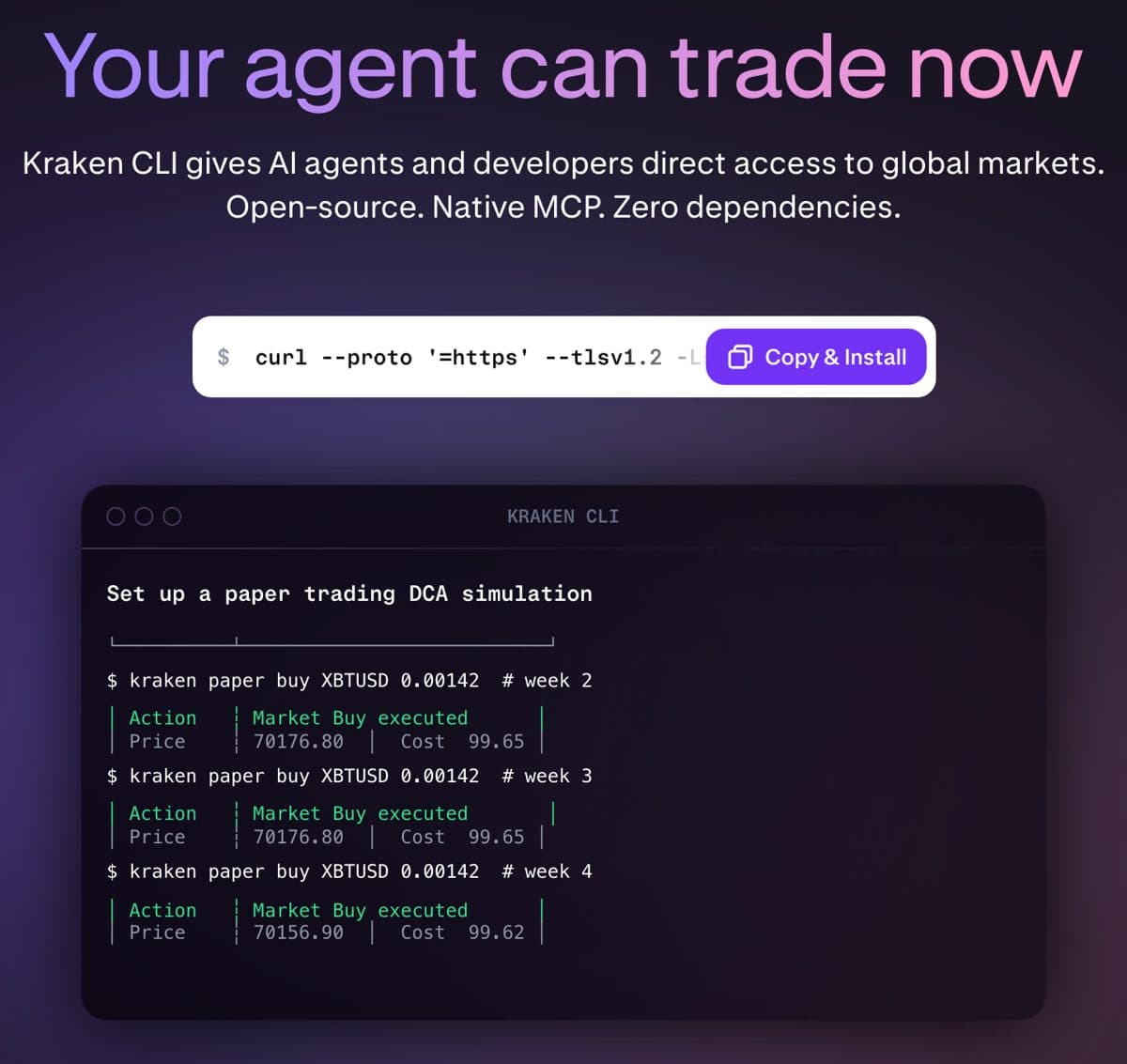
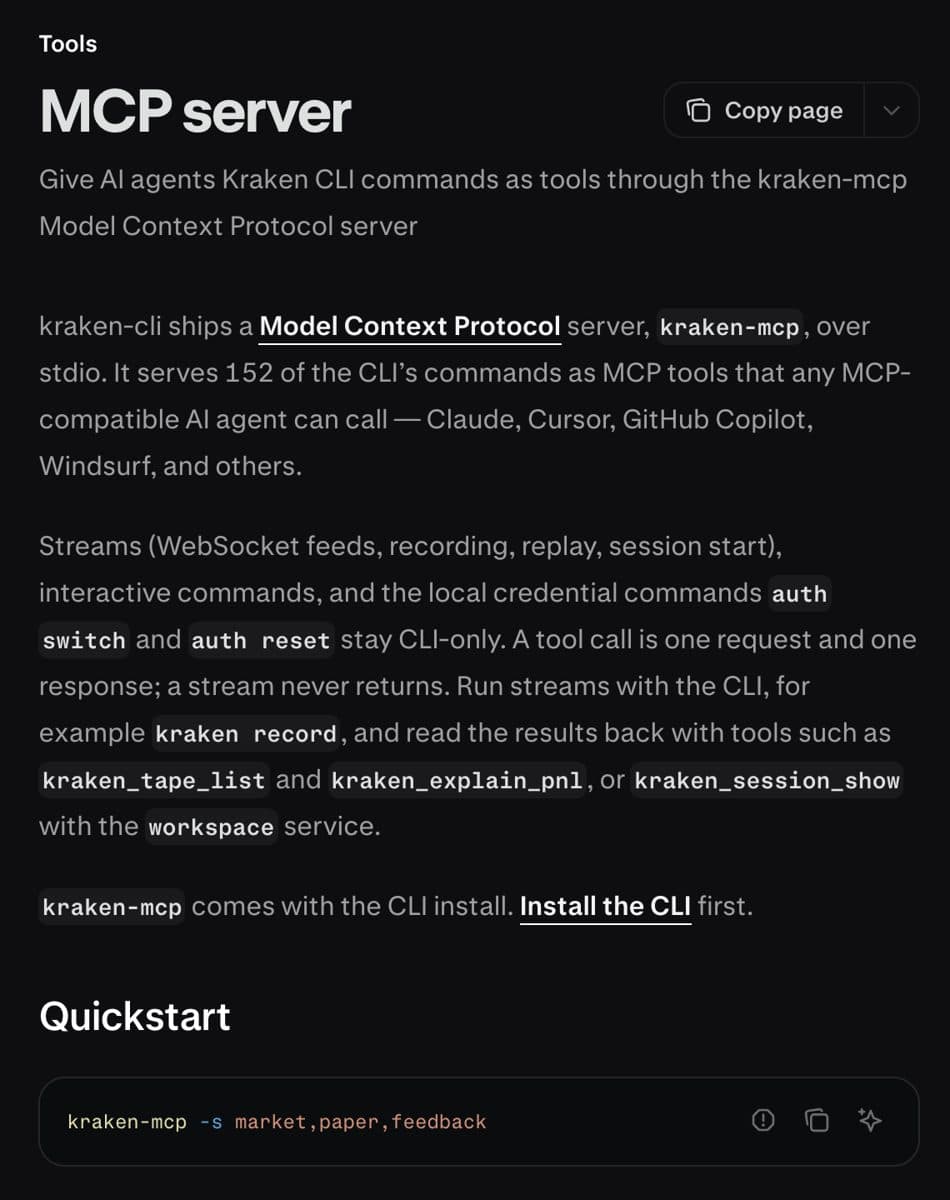
Video: “How To Turn Your AI Agent Into a Trading Bot” by corbin on YouTube. A shorter one: “I Let AI Trade Crypto on My Kraken Account” by Robot Traders. Not made by StarsEarn.
How to Trade Crypto with ChatGPT
ChatGPT can't start a program on your computer, so it needs a remote connector. Coinbase runs one at https://agents.coinbase.com/mcp. In ChatGPT open Plugins → Add → Add Custom MCP Server, paste that address, keep authentication on OAuth and sign in to Coinbase; depending on your plan, developer mode may need to be on. You then choose which Coinbase portfolios the agent can see. Claude.ai works the same way: Customize → Connectors → Add custom connector.
Coinbase recommends a separate portfolio for the agent, funded only with what you're willing to risk. Trades go through Coinbase Advanced Trade at its fees. To revoke access later, go to Coinbase Account → Security → Connections — deleting the chat doesn't disconnect it.
Security: Give an AI Access Without Risking Your Money
- Practice first. Kraken paper trading or Bybit testnet — test the exact prompts you'll use live. On OKX, start the server with --read-only until you trust it.
- No withdrawal permission, ever. A trading key never needs Withdraw Funds.
- A separate pot. A dedicated portfolio or sub-account with a small balance limits any mistake.
- Approve each order. Keep Kraken's approval prompt on; read the order before you confirm.
- Never paste a key into a chat. Save it with
kraken auth loginor as environment variables on your own computer; with Coinbase, sign in through its connector (OAuth) so no key exists at all. A key in a chat ends up in the AI app's history. - Lock the key down. Restrict it to your IP address, and in Kraken's API settings set a maximum position size and a pair allowlist, so even a confused agent can only trade small amounts of the coins you chose.
- Expect repeats. In our test the same order sent twice became two trades — nothing de-duplicates it. Give one instruction per order, ask the agent to check open orders and history before it retries, and for live orders have it set a client order ID (
--cl-ord-id) so a repeat is easy to spot and cancel. - Know the stop button.
kraken order cancel-allpulls every open order (kraken paper cancel-allin practice mode);kraken order cancel-afteris a dead man's switch that cancels everything if the agent stops checking in; and deleting the API key in Kraken Pro cuts the agent off at once; on Coinbase, revoke it under Account → Security → Connections. - Watch the fees. An agent can trade far more often than you would. Kraken Pro's order-book fees are a fraction of the app's 1% plus spread — see Kraken fees.
Coinbase names the two risks that matter most with AI agents (as reported by Yahoo Finance, 23 Oct 2026): prompt injection, where text the agent reads (a web page, a token name, a message) tries to give it orders, and the AI misreading a vague instruction. Clear limits and your approval on every order are the defence.
What AI Trading Costs in Fees
An agent can trade far more often than you would, so the fee per trade decides whether it can pay off. Enter how big and how often it trades; the calculator picks your Kraken Pro tier from the 30-day volume those trades add up to.
Kraken Pro · 0.60%
$36.00 / month
Your 30-day volume $6,000 puts you in the tier from $2,500.
Kraken app · 1% + spread
$60.00 + spread
Instant Buy/Sell; the spread isn't published, so the real cost is higher.
Kraken Pro saves at least $24.00 a month here. To break even, the agent's trades have to earn more than $36.00 a month — that is 0.60% of every dollar it trades. API trades — what every agent uses — are charged at Kraken Pro prices. Paper mode charges a flat 0.26% instead.
Need a Kraken account for your agent?
Kraken Pro: 0.40% limit / 0.80% market orders, not the app's 1% plus a spread. Fund $100 by bank or crypto, trade $100, get $10 in Bitcoin — cards don't count.
Open Kraken Pro · Get $10 BackRelated
Frequently Asked Questions
Can AI trade crypto automatically?
Yes. An AI agent connected through an exchange's MCP server can place orders on its own, and bot platforms run strategies around the clock. On Kraken the safe default is that every live order waits for your approval; you can switch that off, but then the agent trades with no check. Start in paper mode either way.
Can Claude execute crypto trades?
Yes. In our own run on 13 November 2026, Claude used Kraken's official CLI in paper mode and bought 0.00145 BTC at $68,941.90, sold it, placed and cancelled a limit order, and was refused an order bigger than the balance. With an API key and the trade service on, the same commands place real orders, each after your approval.
Can I trade crypto with AI without API keys?
Yes, in practice mode. Kraken's paper trading needs no account and no key: it fills simulated orders at live prices. For real orders you need either an API key (Kraken, Bybit, OKX) or a sign-in through the exchange's own connector (Coinbase, via OAuth) — never paste a key into a chat.
Can AI trading bots lose money?
Yes. In our own test a buy and sell of $100 of Bitcoin two hours apart lost about $1.11 — $0.52 in fees and the rest from the price moving. An agent that trades often multiplies both. No exchange or AI company promises profits.
How much does AI crypto trading cost?
The AI software that connects to the exchange is free (Kraken CLI, Coinbase's MCP server); you pay the exchange's trading fees and your AI plan. On Kraken, API trades are charged at Kraken Pro prices — 0.40% for a limit order and 0.80% for a market order at the entry tier, falling with 30-day volume — against 1% plus a spread in the app. Use the calculator on this page for your numbers.
Can you use Claude for trading?
Yes. Since 2026 Kraken, Coinbase, Gemini, Bybit and OKX publish official MCP connections, so Claude can read prices and your balances and place orders you approve. With Kraken it runs through the Kraken CLI on your computer; with Coinbase it connects as a custom connector in Claude.ai or a remote server in Claude Code. Start in Kraken's paper mode, which needs no API key.
Is Claude good at trading?
Claude is good at the work around a trade — reading order books, summarising news, writing and checking a strategy, keeping a trade log. It does not know where prices go next, and no exchange or AI company claims it does. Treat it as an assistant that executes your rules, test the rules in paper mode first, and approve each live order.
Is ChatGPT or Claude better for trading?
Neither is better at predicting prices. The practical difference is the connection: ChatGPT reaches exchanges through remote connectors such as Coinbase's (Plugins → Add custom MCP server), while Claude Code and Claude Desktop can also run Kraken's local MCP server with paper trading. Pick the app that connects to the exchange you use.
Can I make money with AI trading?
There is no guarantee. An AI agent follows instructions; it does not remove market risk, fees or mistakes. Coinbase itself warns about prompt injection and AI misreading vague instructions, and advises funding a separate portfolio with only what you can afford to lose. Fees matter too: on Kraken Pro a trade costs a fraction of the app's 1% plus spread, which adds up when an agent trades often.
Do AI trading bots actually work?
They execute reliably — that's what the exchanges' MCP servers are for. Whether they make money depends on the strategy, not the bot. Rule-based bots and LLM agents both lose money on bad rules and fees. Test any strategy on simulated money first (Kraken paper trading, Bybit testnet) before you give it real funds.
Which AI is best for crypto trading?
The one that can connect to your exchange with the narrowest permissions. Claude Code, Claude Desktop, Cursor, VS Code, Windsurf and Codex work with Kraken's local server; ChatGPT, Claude, Codex CLI, Grok and Perplexity are on Coinbase's allowlist; Gemini names Claude and ChatGPT.
Can an AI agent withdraw my crypto?
Only if you let it. On Kraken, withdrawal tools sit in a separate 'funding' service that is off by default and marked dangerous; a key without the 'Withdraw Funds' permission can't move money out at all. Coinbase says its CLI key can transfer only between your own portfolios. Never tick 'Withdraw Funds' on a key you give an agent.
Is Kraken's MCP server free?
Yes. The Kraken CLI is open source on GitHub and includes the MCP server; paper trading costs nothing. Live orders pay Kraken's normal trading fees.
How do I connect Claude to Kraken?
Install the Kraken CLI, then run: claude mcp add --scope user kraken -- kraken-mcp -s market,paper,feedback. That gives Claude market data and paper trading. For live trading create an API key with only the query and order permissions, save it with 'kraken auth login', and add the 'trade' service — Kraken then asks you to approve every order.
Sources (read 12 Nov 2026)
- Kraken Developers: MCP server (152 tools, services, approval on dangerous tools)
- Kraken blog: Announcing the Kraken CLI (11 Mar 2026)
- Kraken Developers: API key permissions
- Kraken CLI on GitHub
- Coinbase Developer Platform: Coinbase MCP (remote server, clients, permissions)
- Coinbase blog: Coinbase for Agents
- Gemini blog: Introducing Agentic Trading on Gemini (27 Apr 2026)
- Bybit: official trading MCP server on GitHub
- Bybit press release: official MCP release (22 Apr 2026)
- OKX: Agent Trade Kit on GitHub
- OKX Learn: Connecting agentic trading to OKX with Agent Trade Kit
- Yahoo Finance: Coinbase now lets AI agents trade in your crypto account (23 Oct 2026)
Not financial advice. AI agents can make mistakes; you are responsible for every order you approve.